
Cart is empty
hit

Compatibility:
Versions: Cs-cart 4.1.x-4.22.x
Editions: Multivendor, Multivendor Ultimate, Multivendor Plus, Cs-cart Ultimate, Cs-cart
6 months free updates
30 days money-back on addons: if the add-on does not fit your needs, just request a refund
easy installation via admin panel without changing root files
free consultation on the addon and help with its installation
Fixed price for Ultimate: no need to pay for each additional storefront
Screenshots gallery



Description
A store that buys from suppliers in several currencies has one base currency in CS-Cart, so every rate change means repricing goods by hand or selling at a loss. The Product currency add-on for CS-Cart lets you keep each product, or a whole category, in the currency it is bought in: dollars, euros, yuan, any currency installed in the admin panel. The storefront shows the price recalculated at the store's rates, so prices stay correct without manual repricing. Option modifiers follow the product currency, rounding keeps the figures tidy, and the rates in an order are fixed on the day it is placed. The add-on is installed in minutes.
What the store gets
- A currency per product, chosen on the product editing page or straight in the product list, and a currency for a whole category in one step.
- Storefront prices, sorting by price and the price filter take the product currency into account; option modifiers are applied in the product's currency.
- Rounding of all prices or only of converted ones, to a step from 0.0001 to 1000, plus a correction coefficient that adjusts the converted price.
- Currency rates saved in the order at the moment it is placed: order details and invoices keep the same amounts in every currency even after the rates change.
- Own currency for each product variation (Product variations add-on) and, on CS-Cart Ultimate, a separate currency for a shared product on each storefront; add-on settings are stored per storefront.
- Import and export of the product currency code, search for products by currency in the admin panel and a "Product currency" condition for promotions.
- Works together with the Virtual categories add-on and with Universal data feed by Alexbranding.
How it looks for the customer and the administrator
The customer sees ordinary prices in the storefront currency they have chosen; nothing hints that the product is priced in another currency behind the scenes. Sorting and the price filter work as expected, and the order pages and invoices show fixed amounts.
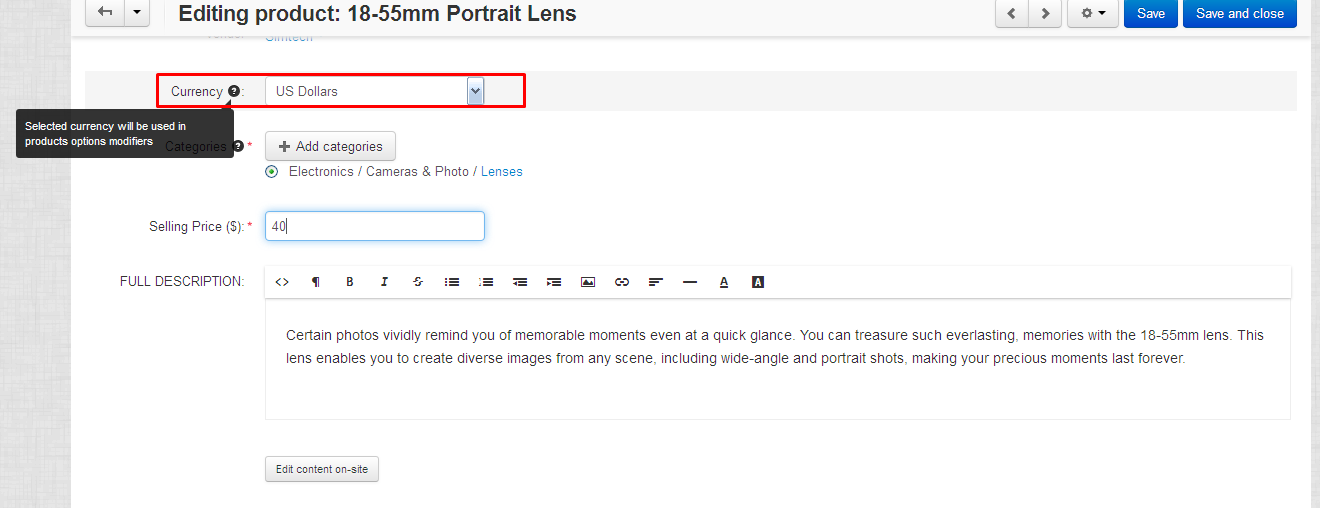
The administrator opens a product, picks a currency from the list of currencies installed in the store and enters the price in that currency. For many products at once the currency is set in the product list, for an entire category or through import. When an order is edited, the converted price is shown. On Multi-Vendor the separate Vendor store currency add-on extends the same logic to vendors.
Compatibility and updates
The add-on works on CS-Cart, CS-Cart Ultimate, Multi-Vendor, Multi-Vendor Plus and Multi-Vendor Ultimate, versions 4.1.x to 4.21.x, and is compatible with PHP 8.3. One license covers one store domain. Six months of updates are included; after that the subscription is renewed only if you want new versions, and the add-on keeps working without renewal.
The add-on works with the currencies already set up in your store, so after installation you only choose a currency for the products that need it.
Add-on features
Each product in its own currency
- Choose the currency on the product
Pick any currency installed in the store on the product editing page, in the product list or for a whole category.
- Prices follow the rates
The storefront shows the price recalculated at the store's current currency rates, so a rate change does not mean repricing by hand.
- Options too
Option modifiers are applied in the product's currency.
Variations, storefronts and vendors
- A currency per variation
With the Product variations add-on each variation can have its own currency.
- A currency per storefront
On CS-Cart Ultimate a shared product can be priced in a different currency on each storefront, and the add-on settings are kept per storefront.
- Multi-Vendor
The separate Vendor store currency add-on extends the same logic to vendors.
What the customer and the administrator see
- Ordinary prices for the customer
Prices, sorting and the price filter work in the storefront currency the customer has chosen; the product currency stays behind the scenes.
- Bulk tools for the administrator
Set the currency in the product list or for a category, import and export the currency code, search products by currency.
- Converted price in orders
When an order is edited, the converted price of the product is shown.
Orders that do not change after the fact
- Rates fixed in the order
Currency rates are saved when the order is placed, so order details and invoices show the same amounts in every currency however the rates move later.
- Correction coefficient
Multiply the converted price by a coefficient of your choice; prices in the base currency are not affected.
- Promotions by currency
A "Product currency" condition lets a promotion apply only to products priced in a given currency.
Settings and compatibility
- Rounding
Round all prices or only converted ones, to a step from 0.0001 to 1000; the rounding is visible when the customer views the store base currency.
- Works with other add-ons
Virtual categories, YML Export, Full page cache with automatic cache refresh, AB price generator, Universal data feed by Alexbranding.
- Per-storefront settings
On CS-Cart Ultimate every storefront has its own add-on settings.
Settings and compatibility
- Rounding
Round all prices or only converted ones, to a step from 0.0001 to 1000; the rounding is visible when the customer views the store base currency.
- Works with other add-ons
Virtual categories and Universal data feed by Alexbranding.
- Per-storefront settings
On CS-Cart Ultimate every storefront has its own add-on settings.
Buy with this addon
Customers questions
Ask question
No questions yet
Reviews
Frequently asked questions
Which CS-Cart editions and versions does the add-on support?
How long does installation take?
Where do I set the currency of a product?
What happens to an order when the currency rates change?
Does it work with product variations and several storefronts?
Can I round the converted prices?
What happens when the included updates end?